
November 20, 2026
How to connect Fork + Farm to your Calgary event run-of-show

Instead of manually relaying every agenda change by email, connect Fork + Farm to your Calgary event run-of-show through one shared schedule, named decision-makers and agreed service cues. For your 2026 corporate event, this guide shows how to turn breakfast, lunch or a holiday reception into a coordinated part of the programme—not a separate planning thread.
- For corporate catering Calgary planning, connect Fork + Farm to one shared event schedule with clear service cues.
- Separate venue access, setup, guest service and clearing rather than treating catering as one arrival time.
- Assign an event lead, venue contact and catering contact before circulating the working schedule.
- Confirm changes directly; editing a shared document does not confirm acceptance.
Why this matters
A run-of-show tells everyone what happens, when it happens and who gives the cue. A catering brief explains the food and hospitality requirements. Connecting them means the person welcoming your guests and the person coordinating service are working toward the same moment.
Fork + Farm is best suited to Calgary corporate hosts seeking full-service, from-scratch catering. The planning trade-off is coordination: your venue, programme and catering arrangements need a shared brief, not separate assumptions.
Start with the Calgary corporate caterer logistics brief if access arrangements or responsibilities are still unsettled. Then bring those decisions into the schedule below.
Before you start
- Gather the working materials. Have your event date, venue details, expected attendance, programme draft, room layout and known dietary requirements ready. Identify anything still awaiting a decision.
- Name the people who can approve changes. Record an event lead, venue contact and catering contact. Ask each person which communication channel to use during the event; do not assume everyone monitors the shared document.
- Resolve the hidden access issue. Guest arrival is not catering access. Confirm when the venue permits unloading, setup and clearing, and distinguish those permissions from the times you want guests served.
You do not need a particular scheduling platform. Use an editable document or spreadsheet your planning team can access, with a readable copy for event day. The field names below are suggested document headings, not buttons or settings in a branded integration.
Event brief and responsibilities
Establish the working document
- Create 1 master schedule for the event. Give it a clear title containing the event name and full date, such as your organisation’s 2026 client reception.
- Add a brief at the top with these suggested fields: Event date, Venue, Guest count, Programme, Dietary requirements and Open decisions. Mark estimates as estimates.
- Create a contact section with 3 contact roles: event lead, venue contact and catering contact. Record each person’s name, agreed contact method and decision-making responsibility.
- Share the brief with Fork + Farm and ask which catering details need confirmation before the schedule becomes your working plan. Distinguish requests from agreed arrangements.
Expected result: everyone can identify the event, find the responsible person and see which details remain unresolved. A blank field is not agreement; give each open decision an owner.
Keep guest information proportionate to its purpose. The wider production team needs service instructions, not a broadly circulated list of personal health information. Agree how to share necessary dietary details with the people responsible for handling them.
Define the handoffs
For each task, name the person who acts and the person who authorises the next step. These are different responsibilities.
For example, your event lead might confirm that the room is ready while the designated catering contact coordinates the agreed service response. Discuss the actual arrangement with your team rather than assigning duties to venue or catering staff without agreement.
Service sequence and programme cues
Build the catering rows
- Add separate rows for Venue access, Setup, Guest arrival, Food service, Clearing and Departure. Delete irrelevant rows only after checking that the underlying task is covered elsewhere.
- Give each row a Planned time, Owner, Cue, Dependency and Status. Keep the wording short enough to scan while standing in an event space.
- Work backward from the guest experience. If lunch follows a presentation, identify the programme cue that releases guests rather than treating the advertised lunch time as the only instruction.
- Ask the venue and catering contacts to review the sequence. Use their confirmed requirements to settle access, setup and clearing times; do not insert assumed service durations.
Expected result: your catering plan shows how service connects to the programme, including what must happen first. Everyone can distinguish a target time from permission to act.
Use the same sequence for a 2026 breakfast meeting or Christmas reception, but change the dependencies to match the occasion. Breakfast might sit before opening remarks; a holiday reception might need service coordinated around welcomes or presentations. Neither sequence should be imposed without discussion.
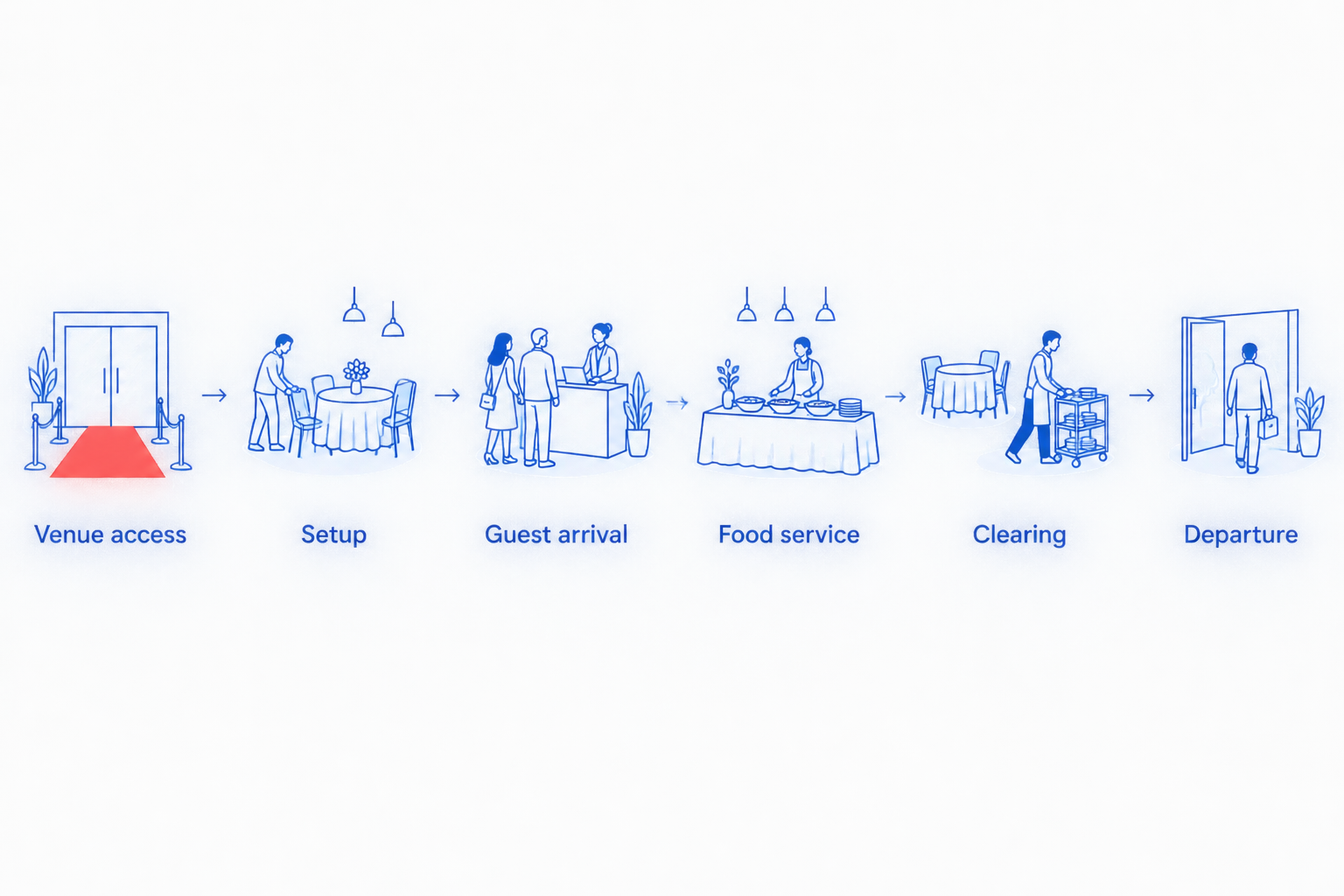
Write cues people can act on
A useful cue names an observable event and an authorised person. Write a proposed instruction such as: event lead confirms the presentation has ended before the agreed service transition begins.
Avoid vague entries such as food after speeches. That leaves unanswered which speech, who communicates the change and what happens if the programme runs late.
Keep clock times and live cues together. The time supports planning; the cue explains the handoff. If either changes, review the other.
Dietary needs and room arrangements
Connect the service details
- Add Dietary handoff to the relevant service row. Record who holds the necessary information and how the agreed meal identification or guest communication will work.
- Add Room layout as a dependency wherever furniture, presentation equipment or guest movement affects service. Reference the current layout by its document name or revision.
- Record Service constraints raised by the venue or catering team. Ask about preparation space, permitted access routes and clearing arrangements rather than assuming they are included or unrestricted.
- Review the plan from a guest’s perspective. Check how someone arriving late finds help, how guests receive dietary guidance and whether service movement conflicts with a speaker.
Expected result: the run-of-show connects timing with the practical details that shape hospitality. Dietary handling and room movement have owners rather than becoming event-day improvisations.
Do not describe a meal as safe for an allergy based only on a menu label. Share the requirement directly and ask the catering team to explain what can be accommodated and what limitations apply.
For a client-facing lunch, protect the transition between conversation and presentation. For an internal breakfast, make the intended relationship between eating and meeting explicit. These are planning choices to discuss, not confirmed service formats.
Confirmation and change control
Set the release process
- Add 2 review checkpoints to your planning process: a working-plan review and a final operational confirmation. Agree when those checkpoints happen with the people involved; these are suggested planning stages, not supplier deadlines.
- At the working-plan review, resolve ownership, access and service dependencies. At final confirmation, check attendance information, dietary communication, programme cues and outstanding decisions against the agreed arrangements.
- Put a revision label on the schedule, such as 2026 event plan — confirmed revision. Add the actual revision date and identify who distributes updates.
- For each later change, record What changed, Who is affected and Confirmation received. Contact affected parties through the agreed channel instead of relying on document notifications.
Expected result: the team knows which schedule governs the event and which changes have been accepted. An edit remains a proposal until the affected people confirm it.
A shared document makes changes visible; it does not make them workable. Moving lunch also requires a conversation about the effect on preparation, service and the rest of the programme.
When the programme changes during the event
The adjacent workflow is live coordination: use the agreed plan as the starting point, then manage an exception through a named decision-maker. This is especially useful when a presentation overruns or an earlier session finishes ahead of schedule.
| Workflow | Best for | Benefit | Limitation |
|---|---|---|---|
| Scheduled service | Corporate events with an agreed programme | Gives the team a common sequence and planning reference | A clock time alone does not explain how to handle a delay |
| Cue-led adjustment | Events where programme transitions need live confirmation | Connects service decisions to what is happening in the room | Requires a reachable decision-maker and direct acknowledgement |
For a live adjustment, follow this sequence:
- Tell the designated catering contact what has changed and what you are requesting. Separate the known fact from your preferred response.
- Ask what adjustment is workable before announcing a revised service time to guests.
- Confirm the agreed response with the venue and programme leads where their work is affected.
- Update the master schedule and tell the relevant team which instruction replaces the earlier one.
Do not use document editing as an emergency communication channel. For a 2026 corporate holiday event, decide before guests arrive who can approve a programme change and how that person will be reached.
Troubleshooting
The presentation runs past the planned meal transition
Contact the catering lead with the programme change and ask for a workable response. Do not assume prepared food can simply wait or that service can move immediately; confirm the revised instruction before relaying it.
Catering access and venue access do not match
Compare the agreed catering access requirement with the venue’s permissions, including unloading and the route into the room. Have the responsible contacts resolve the mismatch before treating either time as confirmed.
Different teams have different schedule versions
Name the current revision and ask the event lead to distribute it through the agreed channel. Mark earlier copies as superseded, and directly confirm any change that affects someone already working from an older version.
A dietary requirement arrives after the working plan
Pass the requirement to the designated catering contact promptly and ask what response can be provided. Update the relevant handoff only after confirmation; do not promise a replacement meal or preparation arrangement yourself.
Clearing interrupts a speaker or guest conversation
Check whether the schedule contains an agreed clearing cue and whether the service team received it. For the next transition, identify the person giving that cue and confirm the instruction directly rather than adding a silent note.
Customize your workflow
Keep the same core schedule for breakfast meetings, training lunches, client gatherings and corporate Christmas occasions. Change the guest journey and programme dependencies, not just the event name.
For a repeat event, duplicate the document structure but clear the confirmed statuses. Previous access permissions, attendance details and service arrangements are reference material—not approval for the next event.
If the venue relationship needs more attention, use the guide to coordinating your venue’s kitchen and staff to prepare the discussion. Bring unresolved responsibilities into your master schedule so they remain visible.
Invite Fork + Farm into that conversation with your event purpose, venue details and draft programme. An enquiry gives you a place to discuss full-service catering without treating an unfinished schedule as a confirmed arrangement.
Start your event conversation
Share your Calgary event details and draft programme to discuss the catering arrangements.
FAQ
How do I connect Fork + Farm to my event run-of-show?
Share your event brief and draft schedule, then agree on catering responsibilities, access requirements and service cues directly. Keep confirmed arrangements in one master schedule and use an agreed contact method for changes.
Do I need special software to coordinate corporate catering in Calgary?
No particular software is required for this workflow. Use a shared document or spreadsheet that your team can access, and confirm operational changes directly with the affected contacts.
What catering details belong in a corporate event run-of-show?
Include venue access, setup, guest arrival, food service, clearing and departure where relevant. Give each activity a planned time, owner, cue, dependency and confirmation status.
Should catering follow the clock or the presentation schedule?
Use a planned time alongside an agreed programme cue. If the presentation changes, ask the catering contact what adjustment is workable before announcing a new service time.
How should I include dietary requirements in the schedule?
Record who manages dietary information and how the agreed service handoff works. Share necessary details directly with the responsible catering contact rather than circulating sensitive guest information throughout the production schedule.
Can I use the same workflow for a corporate Christmas party?
Yes, the same document structure works for a corporate Christmas party. Replace meeting-specific dependencies with the actual reception programme, and confirm venue access, service transitions and clearing arrangements for that event.
Does sending an updated schedule confirm a catering change?
No, sending an updated schedule does not confirm acceptance of a change. Contact the affected people through the agreed channel and record their confirmation before treating the revision as settled.
One last thing
Read the schedule once without looking at the times. Can each person still tell what happens next, what must happen first and who gives permission?
If not, strengthen the cues before adding more detail. A thoughtful handoff helps the people caring for your guests work from the same understanding—and leaves you more room to welcome everyone properly.
Related guides
- Corporate breakfast catering ideas for Calgary offices
- Lunch catering for Calgary client presentations
- Corporate catering for Calgary Christmas receptions


